


- 10+ providersGoogle, Microsoft, iCloud, CalDAV and more
- 1 click to joinor tap the hotkey twice
- 0 serversreplies go straight to your provider
- Freeon Mac and iPhone, no account
See it in action
Everything a day asks of you.
Meetings, errands and birthdays on one calendar. The panels below are live. Click them or press the keys, and they answer the way Cadence does.
- 01InvitationsAccept, Maybe or Decline in place, with undo on every replyA M D
- 02JoinA countdown in the menu bar and Join in one click⌃⌥F ×2
- 03Pre-meeting cardWho is coming and the agenda, five minutes before↩ joins
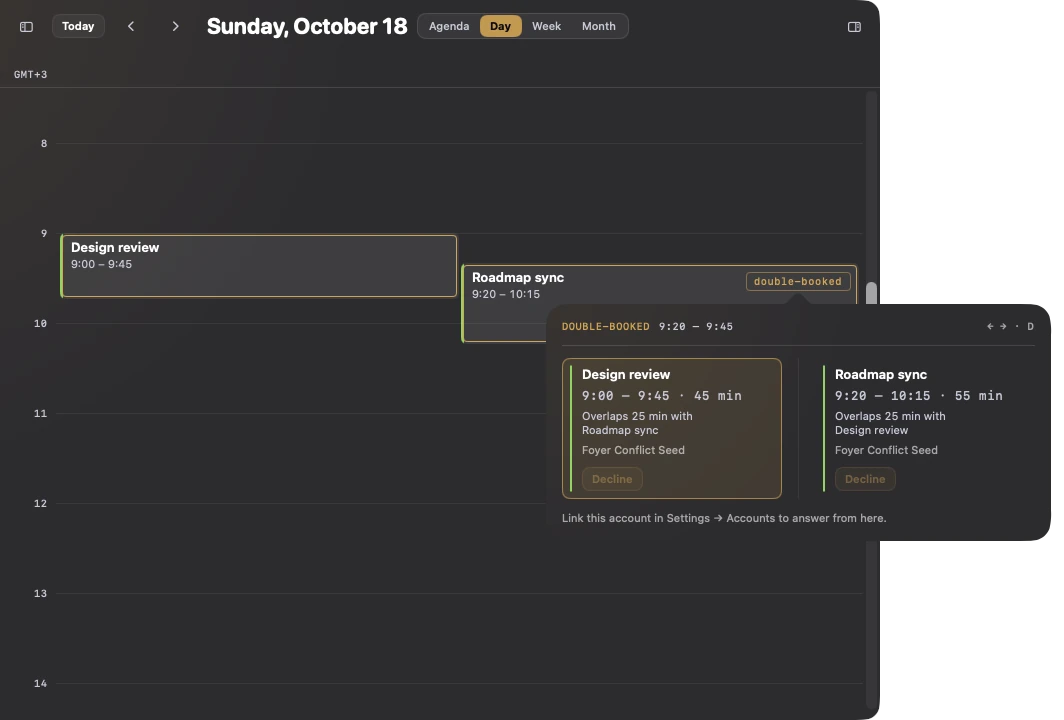
- 04ConflictsDouble-bookings side by side, with Decline on eachD
- 05Quick addType a meeting in plain words and press Return⌘N
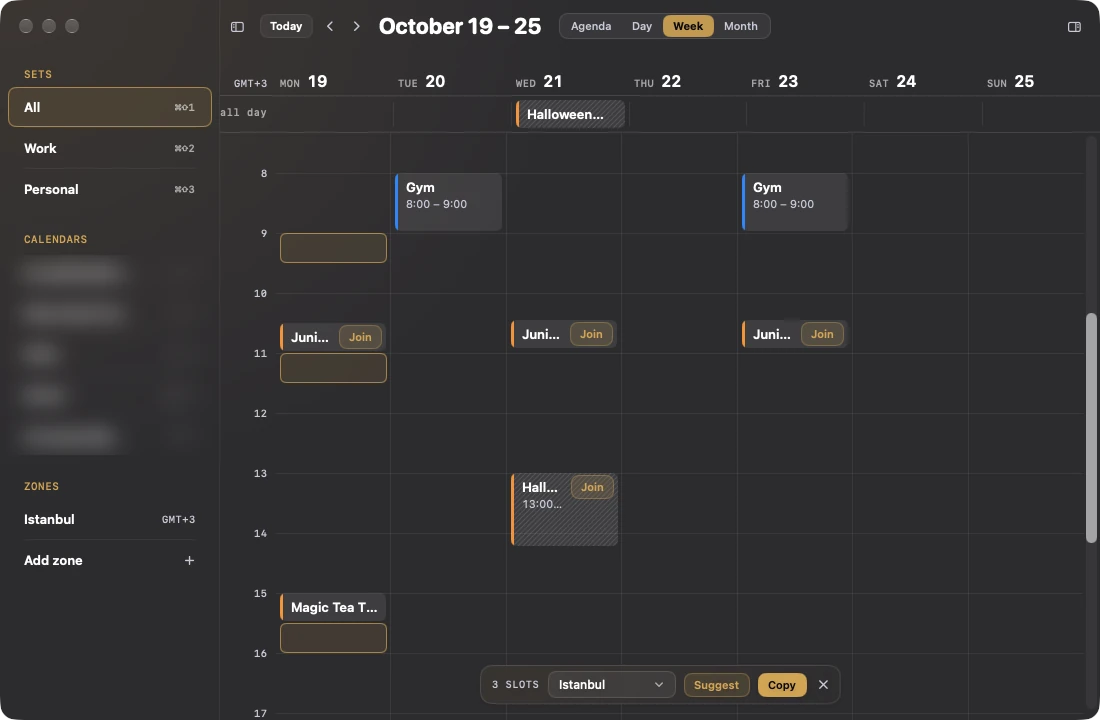
- 06Share availabilityDrag across free time and copy it in any zone⌘⇧A
- 07Time zonesExtra zones down the hour rail, half hours included↑ ↓
- 08Agents and ShortcutsAn MCP server, a command line, Siri and a Focus filtercadence
- 09WidgetsDesktop, Lock Screen and Join in the Dynamic IslandLive Activity
- 10RemindersApple Reminders beside your events, ticked off in placeTasks
- 11Weather and birthdaysThe forecast on each day, and the people to rememberDay
- 12CountdownsDays to a trip, a launch or a birthdayDays
- 13EditingDrag to reschedule, and edit every field of an eventDrag
- 14Your accountsGoogle, Microsoft 365, iCloud, Fastmail, Nextcloud and moreCalDAV
Needs reply
3
All answered. Your organisers already know.
01Invitations
Answer it where you see it
Accept, Maybe or Decline goes out through your own account, and the next calendar refresh confirms it. Every reply waits ten seconds, so Undo always takes it back.
Click a reply, or press A M D. ↑ ↓ pick the row.
02Join
Never miss the start
The menu bar counts down to your next meeting. Join is one click, a double-click on the countdown, or the panel hotkey tapped twice from anywhere. On a meeting in any view, a double-click joins too.
- ⌃⌥FOpen the panel
- ⌃⌥F twiceJoin the meeting
- JJoin from the window
In 2 minutes · 09:30–09:45
Standup
- 11:00Sync with BengaluruTeams
- 14:00Design reviewZoom
2 invitations need a reply
Open CadenceTodaySettings
Click the countdown, or press ⌃⌥F.
03Pre-meeting card
Walk in knowing the room
Five minutes before a meeting with people or a link, the menu bar panel leads with Join, who is coming and the agenda from the notes. It can open itself two minutes before, without taking focus.
- Who has accepted, at a glance
- The agenda pulled from the invitation’s notes
- A time-sensitive reminder a minute before, with Join on it

04Conflicts
Double-booked, side by side
Overlaps among the meetings you have accepted are outlined in every view. The chip opens both meetings next to each other, with Decline on each.
Decline one and the clash is gone.
Planning, up close
Make room without leaving the keyboard.
Add a meeting in a sentence, hand out your free time, and take back any answer.

LondonNew York −5hBengaluru +4:30Tue 27 Oct
07Time zones
Their time, on the rail
Day and week views carry extra zones down the hour rail, half-hour zones and daylight-saving days included. The inspector shows a meeting’s start in each of them.
Move across the day, or focus it and use ↑ ↓.
08Agents and Shortcuts
Ready for your agents
An MCP server runs inside the Mac app, on your machine only, behind a token in your Keychain. A cadence command line speaks to it, and Shortcuts, Siri and Focus plug in too.
- Ten tools: next meeting, agenda, inbox, conflicts, free slots, the brief and more
- Reads are always on. Replies from agents stay off until you allow them
- Run a Shortcut when a meeting starts or ends
- A Focus filter switches the calendar set and can hide declined events
- “Hey Siri, join my next meeting in Cadence”
$ claude mcp add --transport http cadence \
    http://127.0.0.1:<port>/mcp \
--header "Authorization: Bearer <token>"$ cadence agenda today
Agenda for Tue 27 Oct · 3 events
Design review · Tue 27 Oct 11:00–12:00 · in 20m · Work · 4 of 5 going
Roadmap sync · Tue 27 Oct 11:30–12:15 · in 50m · Work · needs your reply
1:1 with Mira · Tue 27 Oct 14:00–14:45 · in 3h 20m · Work · 2 of 2 going
$ cadence reply next accept
$ cadence inbox --json | jq length
209Widgets
On the desktop and the Lock Screen
Next up, Today and Inbox widgets on Mac and iPhone, a Live Activity with Join in the Dynamic Island, and a daily brief at the hour you choose.
Beyond the meeting
The rest of your day is on it too.
Dentist at ten, a birthday on Friday, a trip in nine days. Cadence keeps them where you already look.
Reminders
Apple Reminders sit beside your events with their due times. Tick one off in the agenda, day or week.
Weather and birthdays
A forecast on each day, and birthdays from your contacts, so a rainy Saturday and a friend’s party show up before you plan around them.
Countdowns
Pin a trip, a launch or a birthday and see the days left in the agenda, the menu bar and a widget.
Editing
Drag an event to a new time, or open it and change the title, repeat, alerts, people and calendar.
Works with your accounts
The calendars you already have.
Cadence reads whatever is on your Mac or iPhone, and answers invitations through the provider that sent them.
- Microsoft 365
- iCloud
- Yahoo
- Fastmail
- Zoho
- GMX
- Posteo
- mailbox.org
- Nextcloud
- Other CalDAV
- On-premises Exchange
One permission
No Coursion server.
Tokens stay in your Keychain. Cadence reads the calendars already on your device, and a reply goes straight from it to the provider that sent the invitation. There is no Cadence account and nothing in between.
Not granted yet
Allow the apps below to access your calendars.
 Cadence
Why Cadence
Native. Direct. Free.
A calendar for the meetings other people put on it and the plans you make yourself, that keeps your accounts to itself.
Native on both
SwiftUI on macOS 26 and iOS 26, sandboxed, from the App Store. Settings follow you through your own iCloud.
Your own accounts
Replies go from your device to the provider that sent the invitation. No Coursion server, no proxy.
Keychain only
Sign-in tokens and app-specific passwords live in your Keychain. No analytics. Read the privacy policy.
Free, all of it
Replies, reminders, weather, join, conflicts, widgets and agents on Mac and iPhone. No account and no subscription.
Keep work and life in time.
Cadence is free on Mac and iPhone, and arrives on the App Store soon.
macOS 26 and iOS 26 · Sandboxed, from the App Store